
Parse website text for articles, reviews, and news posts
Collect text from links for articles, reviews, and news. Connect parsing to search, pass materials to AI, and check pages that could not be processed.
On this page6
Use articles from blogs, reviews, and company pages as source material for your own content. Page parsing extracts texts from your links. You can compare them, study them, or pass them to AI to prepare an article with your own conclusions and examples.
In a workflow, parsing connects the links it finds with writing the text. For example, search finds news, parsing gets the details of the events, and the next step writes a post for your channel. Steps pass materials to each other, so you don't need to copy the text of each page by hand.
How to collect materials for a review or comparison
Suppose you are preparing a review of three delivery services for online stores. For each one, you need the service area, delivery times, restrictions, and return terms. This information is on different pages of the companies' websites.
In Kotia, you can pass links to the selected pages to "Page parsing." The texts are passed to an analysis step that compares the terms. All that's left is to check the result and use it in your review.
- Choose sources. Take pages with the terms of the services you need. A link to a specific section is more useful than a home page if that's where delivery times and restrictions are published.
- Collect text with parsing. Add the addresses to the "Page parsing" card. How to set it up is described below.
- Set comparison criteria. Connect an analysis step, list the information you need to find in the texts, and specify the output format, for example a table for the review.
Example task for the analysis step:
Compare the delivery services based on the materials provided. Make a table: service, service area, delivery times, shipping restrictions, product returns. Keep links to the sources. If a term is not stated, write "no data" and do not make assumptions. After the table, list the differences that matter for a small online store.
This gives you the basis for an article: information on the same criteria, links to sources, and a list of questions the sources didn't answer. You can write the review yourself based on this table, or assign the writing to the next step in Kotia.
Parsing is only responsible for extracting text, while comparison and writing are done by separate steps. So you can use one collection for different tasks. It's enough to change the instructions for processing, and you don't need to collect the pages again.
How to prepare a news story from source publications
Search results usually include a headline, a date, and a link. For a news story, that's not enough: important terms, figures, and explanations are in the publication itself. Parsing gets these details before the text is written.
For example, for a blog about online retail, you can set up this sequence:
- "News search" finds publications on the topic.
- A selection step picks the event and saves links to suitable sources.
- "Page parsing" extracts the texts of the publications.
- A writing step explains what happened, who it affects, and what changes for the reader.
- The finished news story is saved to a document or sent as a draft to WordPress.
In the writing task, specify the audience, the details you need, and a requirement to keep the links. For example: "Explain the new delivery terms for owners of small stores: when they take effect, which orders they affect, and what exceptions there are. Use only information from the texts provided."
For regular work, add "Skip repeats" after the event selection and before parsing. That way, news you have already processed won't be sent to writing again. The filter remembers an event before parsing. So if further processing fails, check the list that this filter keeps before running it again.
How to set up parsing in Kotia
- Open the workflow on a computer. In the step-adding menu, select "Page parsing" in the services section.
- Open the card settings and paste the links into the "Page addresses" field. It's more convenient to enter one address per line.
- If parsing should start with your links, connect it to the start of the workflow. If the addresses come from another step, connect the text output of that step, and you can leave the address field empty.
- Connect the parsing result to an analysis or writing step. To keep the source texts, use "Document" and choose a document to write to.
- Run the workflow and open the parsing result. Check which pages were processed before you use information from them in a publication.
Only links are entered in the "Page addresses" field. Instructions such as "compare the terms" or "write a review" are given to the step that receives the collected text.
How to pass links and work with a large collection
Addresses can be stored in the parsing settings, received from another step, or both at once. Kotia combines links from the field and incoming text, removes duplicates, and processes up to 20 addresses per step.
This is useful when some sources are permanent and others change. For example, you can enter the terms of selected companies in the field and receive new publications about them from search. Both link sources count toward the shared limit.
Input rules:
- In the address field, you can paste links without
https://. - In incoming text, use the full address or an address starting with
www.so the link is recognized unambiguously. A domain without a protocol will also work if it's on a separate line. - In a list of links, you can leave headings and descriptions. You don't need to delete them by hand. Domains with Cyrillic characters are supported too.
If there are more links than the limit, the first 20 are processed, and a message about this appears in the result. For a large review, select the pages you need in advance or split the addresses into groups.
Parsing processes the pages you specify, not the entire site, even if you specify one address. If you need to select articles from a blog, first get the list of the site's articles. If you still need to find sources by topic, use "Source collection".
How to check the collected text and fix errors
The card's result includes the texts of the processed pages. This same result is passed to the next step. At the end, it lists the addresses that could not be processed and the reasons for the errors.
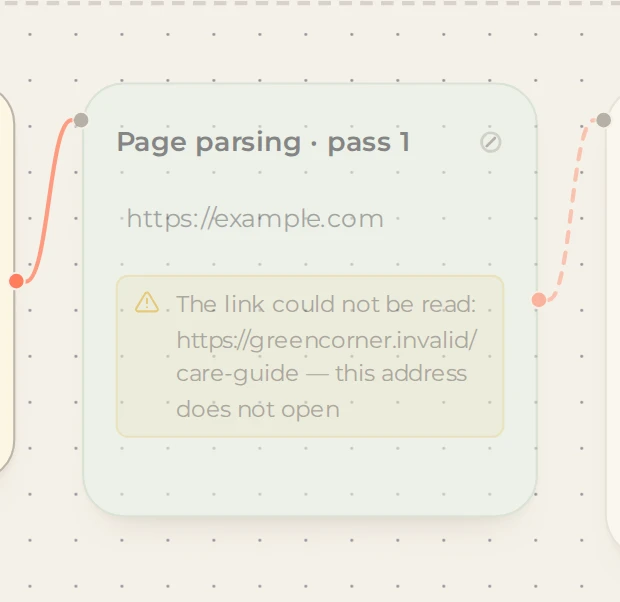
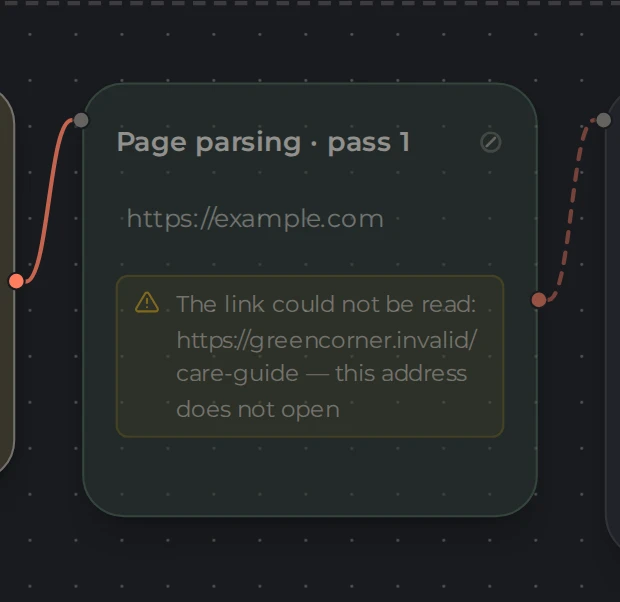
In a loop, an unreadable link does not stop the workflow. If a page gave no text for a reason of its own, the next pass takes the next link. If the list has more lines, a spare pass takes the failed one's place, up to three. The run message in the chat says how many passes were done and how many links could not be read, and Kotia names the addresses when you press "Find out why"; in the run history that pass is gray and shows the address and the reason. If none of the links could be read, the run ends with an error. If a page did not answer in time or the reading service is unavailable, the card ends with an error and the loop stops, so the next lines are not used up for nothing. Outside a loop, an unreadable page still stops the workflow.
 1
- 1The address and the reason on the pass card
A successful status means that the text of at least one page was received. Before comparing several companies, make sure you have data for each of them. If one site is unavailable, the next step will get an incomplete collection.
Long pages and the overall result have size limits. If text is shortened because of the limit, Kotia reports this. If your task requires the full document, check this message before analysis.
| What happened | How to proceed |
|---|---|
| No links found | Check "Page addresses" and the result of the previous step. You need URLs, not just publication titles. |
| A feed or table of contents was received instead of the material | Specify the address of the specific article or section with the terms you need |
| The page is empty or has too little text | Check the link and find another source with the information you need |
| The site requires login or shows a robot check | Use an accessible source, or pass the text manually through "Data" |
| The platform is not supported | Find the publication on a regular website. This card does not process social networks, video services, or messengers. |
| The site did not respond or a temporary connection error occurred | Run parsing again later, using the links you have already found |
The text of a finished article is not suitable as input for this card, because the card takes addresses. If you need to revise an article you've already written, use its text in an editing step.
A large collection can take several minutes to process. Detailed progress for the card is not shown. You can check the status and result in the run log.
How much parsing and reprocessing cost
Parsing costs 1 token per step, regardless of the number of addresses within the limit. Search, analysis, and writing are paid separately.
If not a single page could be processed, the parsing fee is refunded. If the text of at least one page is received, the step is charged in full.
When you run it again, the links are processed anew, and a new parsing step is charged. If sources are already collected and you only need to change the comparison or the article text, repeat the corresponding processing step rather than parsing. Parsing again is needed only when you want to fetch the content of the pages anew.