
Write a post or article from a link with Kotia
Send a link to Kotia and get a post or article based on the source. Set the audience and format, keep the key facts, and check the result against the original.
On this page5
Send the link to the Kotia chat to prepare your own post or article based on the published material. The agent can read the page, pick out the facts that matter to your audience, and present them in the format you need. This is useful for analyzing a news story, explaining a product update, or preparing a note on an industry article.
You decide what the rewrite should achieve: what your readers find interesting, which details to keep, and what conclusion they need. For example, you can turn a long press release into a clear post for store owners, or turn a detailed article into a short analysis for a professional channel.
Example: an update to a service for small businesses
Suppose a delivery service has published new terms for stores. Your readers care about three things: what changed, who it affects, and whether they need to do anything.
Read the article at this link: [paste the address]. Prepare a post for a Telegram channel for owners of small online stores. Explain what changed in the delivery terms, when the changes take effect, and who they affect. Keep the exact names and dates. If the store doesn't need to take any action, or the source says nothing about it, don't make up instructions. Add a link to the original. Length: up to 1,800 characters, with no promotional claims.
Before sending, replace the address and the example's terms with your own. The facts come from the original article, and your request sets how to present them to the reader.
How to prepare material from a link
- Open the original article and copy the direct link to the piece, not the website's home page.
- Paste the link into the chat and ask Kotia to read the page.
- Specify the audience, format, and goal of the text: explain the change, highlight the main point, or compare it with the previous terms.
- Name the facts to keep: dates, names, figures, restrictions. Say whether it is allowed to look for additional information.
- Ask it to add a link to the source and send the message.
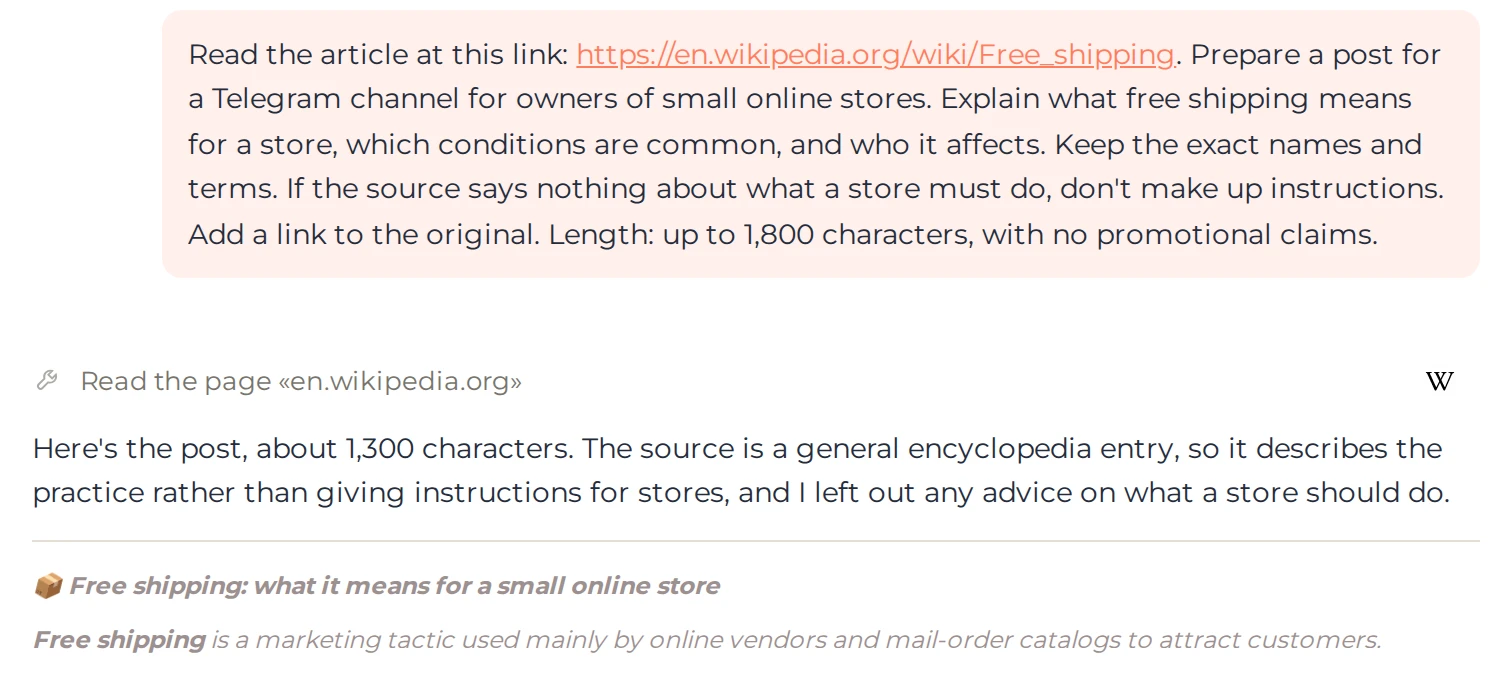
- Check the response: did the agent get the page content, which facts did it use, and does the response contain the requested text?
 123
- 1The link in your message
- 2The page was read
- 3The post based on the page
You can ask for the source to be read and the text to be written in one message. For complex material, it's easier to first get a list of facts, check it, and only then ask for the writing.
How to check the result
Compare against the original the information the article rests on: deadlines, terms, quantities, and quotes. Keep the attribution for direct quotes and the link to the original.
Check the meaning too: a time-limited promotion must not become a permanent term, availability for some customers must not become availability for everyone, and a planned change must not become one that is already in effect. This matters especially when you shorten a long text into a short post.
If the result is too close to a summary of every paragraph, clarify the task:
Keep only the changes that affect how a small store works. Start with the practical consequence, then give the terms and the date. Remove the company's history and the promotional wording from the press release.
If the page could not be read
Reading may be blocked by a sign-in requirement on the site, access restrictions, or how the page is built; links to social networks and videos may not open either. The address in your request alone does not confirm that the agent received the page content: if the page did not open, you can see it in the steps line above the reply. To keep the agent from writing from the headline alone, add to your request: "If you couldn't read the page, say so and don't make anything up."
Provide the text of the article you have access to or attach a file, and keep the link to the original. If only part of the text is available, ask it to work only with that part and not to fill in missing information with guesses.
When to use a service or a workflow
For a post or a short analysis, you can keep working in the chat and correct the result with messages. If you need a standalone long piece with a separate preparation process, use the Article service, after checking the order settings first.
If you regularly prepare material from many links, you can build this sequence into a workflow: page parsing gets the content, and the next step uses it when preparing the text. To find topics in blogs that interest you, the site article list will be useful.